
MeterOn2.0 - App Store
You'll be able to see results in few seconds.
Publisher Description
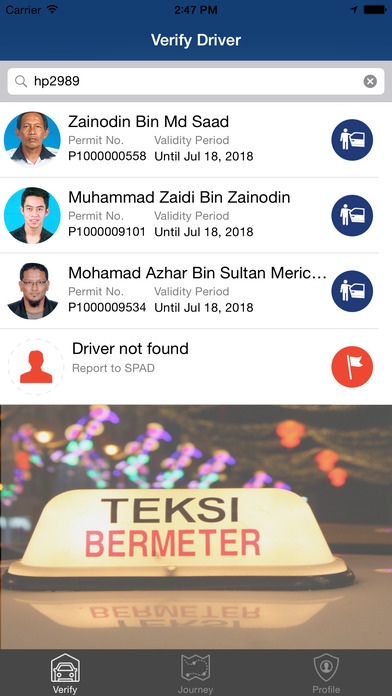
MeterOn mobile app is intended to assist the public to check and verify status of a taxi driver before starting a new journey. By simply entering the vehicle registration number, you can view details of the driver, check driver s offence records and passenger s feedback on the particular driver. This is in line with the commitments of S.P.A.D. to ensure that the passengers can ride a taxi and safely arrive at the destination.
Key features:
---------------
* Driver Verification
* Journey Tracker
* Fare Estimation
* Driver Rating and Meter Usage
* SOS Alert
* Feedback/Report
MeterOn mobile app allows you to verify driver, track your journey, estimate the fare for a particular journey, and send SOS alert in case of emergency during your trip.
At the end of a journey, users can rate their driver and lodge a report if meter has not been used. Feedback and report can be made directly to S.P.A.D. and action will be strictly taken against taxi driver and taxi operators.
This application contains comprehensive data on licensed taxi drivers (including airport taxis and hired cars) in Peninsular Malaysia. MeterOn is available in both English and Bahasa Malaysia, the language can be set by changing the language configuration in your mobile phone.
Disclaimer: Continued use of GPS running in the background can dramatically decrease battery life.
Requires iOS 7.1 or later. Compatible with iPhone, iPad, and iPod touch.
About MeterOn
The company that develops MeterOn is Suruhanjaya Pengangkutan Awam Darat (S.P.A.D.). The latest version released by its developer is 2.0.
To install MeterOn on your iOS device, just click the green Continue To App button above to start the installation process. The app is listed on our website since 2015-03-23 and was downloaded 0 times. We have already checked if the download link is safe, however for your own protection we recommend that you scan the downloaded app with your antivirus. Your antivirus may detect the MeterOn as malware if the download link is broken.
How to install MeterOn on your iOS device:
- Click on the Continue To App button on our website. This will redirect you to the App Store.
- Once the MeterOn is shown in the iTunes listing of your iOS device, you can start its download and installation. Tap on the GET button to the right of the app to start downloading it.
- If you are not logged-in the iOS appstore app, you'll be prompted for your your Apple ID and/or password.
- After MeterOn is downloaded, you'll see an INSTALL button to the right. Tap on it to start the actual installation of the iOS app.
- Once installation is finished you can tap on the OPEN button to start it. Its icon will also be added to your device home screen.
Program Details
General
System requirements
Download information
Pricing
Version History
version 2.0
posted on 2015-03-23
Disclaimer
Official App Store Link
We do not host MeterOn on our servers. We did not scan it for viruses, adware, spyware or other type of malware. This app is hosted by Apple and passed their terms and conditions to be listed there. We recommend caution when installing it.
The App Store link for MeterOn is provided to you by apps112.com without any warranties, representations or guarantees of any kind, so access it at your own risk.
If you have questions regarding this particular app contact the publisher directly. For questions about the functionalities of apps112.com contact us.
